Tools
HTML/CSS/JS

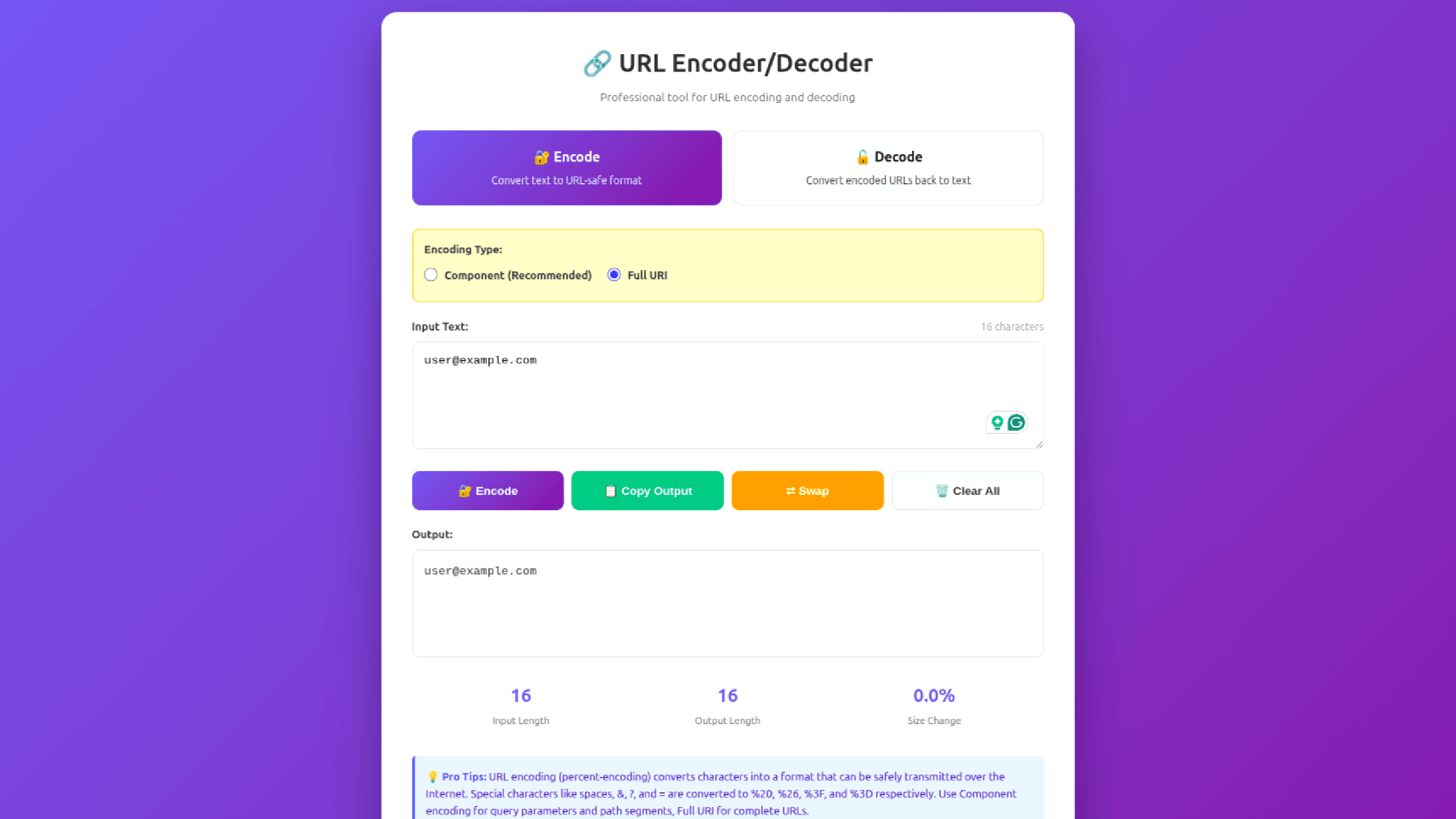
URL Encoder & Decoder Tool Template

A modern, fully responsive URL Encoder & Decoder website template built with pure HTML, CSS, and Vanilla JavaScript. This template is 100% free and ready to deploy — perfect for developers, SEO professionals, and tool websites looking to launch a high-quality online utility without backend complexity.

Download Template

This template is free to download and use in your projects.

0 downloads
0 (0 reviews)
0 views
URL Encoder & Decoder Tool Template

Why This Free Template Stands Out

Most free tool templates are either outdated or poorly optimized. This template is designed with real-world usage, performance, and SEO in mind, making it suitable for production use right out of the box.

✔ Clean UI
✔ Fast performance
✔ SEO-friendly structure
✔ Accessibility support
✔ Zero dependencies

✨ Key Features

  • 🔐 Encode & Decode Modes
    Switch between URL encoding and decoding instantly.

  • 🔄 Multiple Encoding Types
    Supports both encodeURIComponent and encodeURI.

  • ⚡ Real-Time Processing
    Output updates instantly as users type.

  • 📋 Copy to Clipboard
    One-click copy with fallback support.

  • ⇄ Swap Input & Output
    Quickly reverse encoded and decoded text.

  • 📊 Live Statistics Panel
    Shows input length, output length, and size difference.

  • 📝 Built-In Examples
    Click-to-load examples for quick testing.

🎨 Modern UI & UX

  • Gradient background with glassmorphism-style card

  • Smooth hover effects and transitions

  • Mobile-first responsive design

  • Keyboard shortcuts for power users

  • Toast notifications for actions

Designed to feel premium, even though it’s free.

🚀 SEO & Accessibility Ready

This template follows best practices for search engines and accessibility:

  • Semantic HTML5 structure

  • SEO-friendly meta tags

  • ARIA labels & screen reader support

  • Keyboard navigation

  • Fast load times (no frameworks)

Perfect for ranking as a free online tool on Google.

⚡ Performance Optimized

  • No frameworks, no jQuery

  • No backend required

  • Lightweight & fast

  • Runs fully in the browser

  • Privacy-friendly (no data sent to servers)

🧩 Easy Customization

You can easily:

  • Change colors and branding

  • Modify UI text

  • Add ads or analytics

  • Embed into a tools website

  • Extend with more encoders/decoders

Beginner-friendly and well-structured code.

📦 What You Get

  • Single HTML file

  • Embedded CSS & JavaScript

  • Clean, commented code

  • Fully working URL tool

  • Production-ready design

👨‍💻 Perfect For

  • Free online tools websites

  • Developer utilities platforms

  • SEO & marketing tools

  • Students & learners

  • SaaS MVPs

  • Template marketplaces

📄 License

100% FREE
✔ Personal use
✔ Commercial use
✔ No attribution required
✔ Modify & redistribute allowed

🚀 Launch in Minutes

  1. Download the file

  2. Upload to any hosting (Vercel, Netlify, GitHub Pages, shared hosting)

  3. Done — your tool is live!

🎯 Download this free URL Encoder/Decoder template and launch a professional online tool today.

High quality. Zero cost. No limits.

How to Run & Customize This Template

This download includes the source files for URL Encoder & Decoder Tool Template, built with HTML/CSS/JS. You can adapt the layout, typography, and color tokens for personal or client projects without attribution.

  1. Extract the archive: Download the ZIP file or clone the repository and open the project folder in VS Code or your preferred editor.
  2. Preview locally: For static HTML/Tailwind templates, open index.html with a local development server (such as the VS Code Live Server extension or npx serve .) so relative asset paths resolve cleanly. If the project includes a package.json, run npm install followed by npm run dev.
  3. Replace colors and fonts: Search for the primary accent utility classes or CSS custom properties and swap them to match your brand palette. Before deploying to production, compile Tailwind CSS locally instead of relying on the Play CDN script.
  4. Check responsive breakpoints and accessibility: Test the layout at 375px (mobile), 768px (tablet), and 1280px (desktop), and verify that interactive buttons, links, and menus work with keyboard navigation.

Need help customizing or found a bug in the source files? Read our production customization guide or report an issue to the editor.

Follow Us

Share Your Feedback

Did you find this template useful? We'd love to hear your thoughts and suggestions to improve our templates.

Share Feedback