🌟 Overview
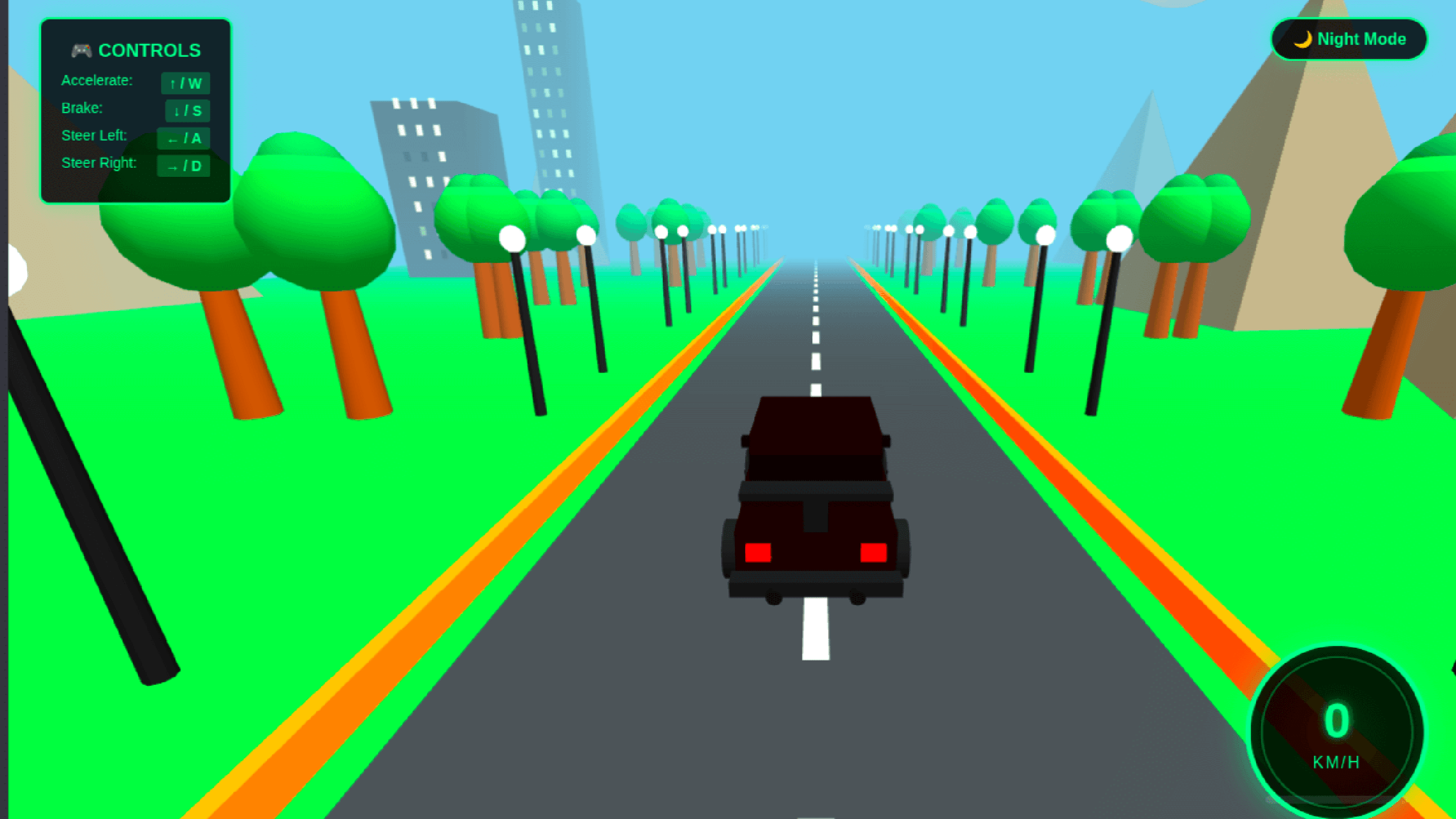
This 3D car driving game template is a fully functional, ready-to-use racing simulation that runs instantly in any modern browser. It features realistic car movement, dynamic environments, day/night lighting, and a professional HUD — making it perfect for portfolios, demos, learning projects, and customization.
No installations.
No build tools.
No external assets.
Just open the HTML file and drive.
✨ Key Highlights
🚘 Realistic 3D Car Design
-
Detailed sports car model built using Three.js primitives
-
Metallic body with reflective materials
-
Transparent glass windows
-
Chrome wheels with realistic rims
-
Functional headlights and tail lights
-
Spoiler, exhaust pipes, mirrors, and body detailing
🎮 Advanced Driving Physics
-
Smooth acceleration and braking system
-
Speed-based steering (easy control at low speed, realistic challenge at high speed)
-
Anti-slip traction control
-
Natural friction and grip simulation
-
Keyboard controls (Arrow keys + WASD)
🌍 Dynamic Infinite Environment
-
Endless looping road with lane markings
-
Procedurally generated roadside scenery
-
Animated trees with layered foliage
-
Buildings with glowing windows
-
Moving clouds with parallax depth
-
Distant mountains for realism
-
Street lamps along the road
-
Everything scrolls dynamically as the car moves
🌓 Day & Night Mode
-
One-click toggle between day and night
-
Realistic lighting transitions
-
Blue sky during daytime
-
Dark, starry night environment
-
Atmospheric fog for depth and immersion
📊 Professional Game UI
-
Animated speedometer (0–200 km/h)
-
Real-time speed display
-
Gradient progress indicators
-
Neon-style glow effects
-
On-screen control instructions
-
Clean, modern HUD design
🎨 Visual & Rendering Effects
-
Real-time shadows
-
Metallic and emissive materials
-
Headlight and taillight glow
-
Smooth camera follow system
-
Fog-based depth enhancement
🛠️ Technical Details
-
Framework: Three.js (CDN-linked)
-
File Type: Single HTML file
-
File Size: ~9 KB
-
Browser Support: Chrome, Firefox, Safari, Edge
-
Mobile Friendly: Yes
-
Performance: Optimized for ~60 FPS
-
License: Free for personal & commercial use
🚀 Quick Start
-
Download the HTML file
-
Open it in any modern web browser
-
Press ↑ / W to accelerate
-
Use ← → / A D to steer
-
Toggle Day/Night mode with the on-screen button
No setup. No dependencies. No hassle.
🎨 Easy Customization
All major settings are clearly defined and commented, making customization simple:
-
Car colors & materials
-
Speed limits and acceleration values
-
Steering sensitivity
-
Camera position & angles
-
Environment density (trees, buildings, fog)
-
Lighting and shadow intensity
Perfect for learning, experimenting, and extending.
🎯 Ideal For
-
Web developers learning Three.js & WebGL
-
Game developers prototyping racing mechanics
-
Students studying 3D graphics and physics
-
Portfolio projects and demos
-
Educational institutions and workshops
-
Custom racing game development
🎓 Educational Value
This template helps you understand:
-
Three.js scene setup and rendering pipeline
-
Game loops and animations
-
Keyboard input handling
-
Camera follow mechanics
-
3D lighting and materials
-
Physics-based movement logic
-
UI overlays in HTML5 games
The code is fully commented, well-structured, and beginner-friendly.
📦 What’s Included
✅ Complete working 3D racing game
✅ Single HTML file (no setup required)
✅ Clean, readable, commented source code
✅ Responsive and optimized design
✅ Professional UI and visual effects
✅ Free for personal and commercial use
⭐ Why This Template?
Unlike heavy game engines or complex frameworks, this template focuses on simplicity, performance, and clarity. It’s ideal for anyone who wants to learn how a 3D browser game works under the hood or quickly launch a racing game prototype.
Download now and start building your own high-performance 3D racing experience directly in the browser. 🏎️💨
How to Run & Customize This Template
This download includes the source files for 3D Car Driving Game (Three.js), built with HTML/CSS/JS. You can adapt the layout, typography, and color tokens for personal or client projects without attribution.
- Extract the archive: Download the ZIP file or clone the repository and open the project folder in VS Code or your preferred editor.
- Preview locally: For static HTML/Tailwind templates, open
index.html with a local development server (such as the VS Code Live Server extension or npx serve .) so relative asset paths resolve cleanly. If the project includes a package.json, run npm install followed by npm run dev. - Replace colors and fonts: Search for the primary accent utility classes or CSS custom properties and swap them to match your brand palette. Before deploying to production, compile Tailwind CSS locally instead of relying on the Play CDN script.
- Check responsive breakpoints and accessibility: Test the layout at
375px (mobile), 768px (tablet), and 1280px (desktop), and verify that interactive buttons, links, and menus work with keyboard navigation.
Need help customizing or found a bug in the source files? Read our production customization guide or report an issue to the editor.
 games